1. La "Timeline Intelligente" (En haut - Navigation Visuelle)
C'est une superbe fonctionnalité UX. Elle transforme une barre de progression ennuyeuse en un véritable outil d'analyse visuelle instantanée.
Voici une proposition d'implémentation en React JS.
L'Approche Technique
Pour réaliser cette "Timeline Intelligente" qui ressemble à celle de SoundCloud mais enrichie, nous allons utiliser une stratégie de superposition de couches (Layers) en CSS absolu.
Nous aurons 3 couches superposées dans un conteneur parent :
- Couche de Fond (Sentiment) : Des blocs de couleurs (divs) juxtaposés dont la largeur est proportionnelle à la durée du sentiment.
- Couche de Progression (Playhead) : Une barre semi-transparente qui indique où l'on en est dans la lecture audio.
- Couche des "Pins" (Marqueurs) : Des icônes positionnées en absolu (pourcentage de la gauche) qui flottent au-dessus de la timeline.
1. La Structure des Données (Le Contrat d'Interface)
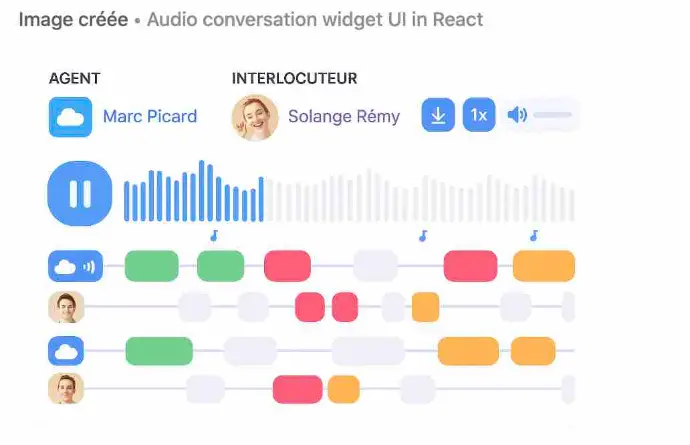
Image du code
Ci-dessous GPT a pondu cette image qui interprête le code de ci-dessous
2. L'Implémentation React Component
Voici une version ReactJS plus fidèle à la maquette que tu as envoyée, avec :
- 1 timeline globale (0 → fin)
- des tracks par interlocuteur, alignées sur le même axe temps
- des segments colorés (vert / rouge / orange / gris) qui s’alternent sans chevauchement
- une structure data facilement extensible à 3, 4 interlocuteurs.
import React, { useState } from "react";
import { Play, Pause, Download, Volume2 } from "lucide-react";

// Durée totale de l'appel (en secondes)
const TOTAL_DURATION = 600;

// --- PARTICIPANTS (extensible à 3+ personnes) ---
const PARTICIPANTS = [
  {
    id: "agent",
    roleLabel: "AGENT",
    name: "Marc Picard",
    color: "text-sky-500",
    avatarType: "icon", // icon ou image
    avatarUrl: "", // non utilisé ici
  },
  {
    id: "client",
    roleLabel: "INTERLOCUTEUR",
    name: "Solange Rémy",
    color: "text-purple-500",
    avatarType: "image",
    avatarUrl: "https://i.pravatar.cc/150?u=solange",
  },
];

// --- SEGMENTS D'ALLOCUTION ALIGNÉS SUR LA MÊME TIMELINE ---
// Hypothèse : pas de chevauchement (on alterne agent / client)
const SEGMENTS = [
  { speakerId: "agent", start: 0, end: 60, sentiment: "positive" },
  { speakerId: "client", start: 60, end: 120, sentiment: "neutral" },
  { speakerId: "agent", start: 120, end: 210, sentiment: "positive" },
  { speakerId: "client", start: 210, end: 260, sentiment: "negative" },
  { speakerId: "agent", start: 260, end: 330, sentiment: "neutral" },
  { speakerId: "client", start: 330, end: 420, sentiment: "negative" },
  { speakerId: "agent", start: 420, end: 490, sentiment: "key" },
  { speakerId: "client", start: 490, end: 540, sentiment: "neutral" },
  { speakerId: "agent", start: 540, end: 600, sentiment: "key" },
];

// Simple waveform mock
const WAVEFORM = Array.from({ length: 90 }, (_, i) =>
  i < 40 ? 40 + (i % 10) * 3 : 20 + (i % 8) * 2
);

// Couleur de remplissage selon le sentiment
const sentimentColor = (sentiment) => {
  switch (sentiment) {
    case "positive":
      return "bg-green-400";
    case "negative":
      return "bg-rose-400";
    case "key":
      return "bg-amber-400";
    case "neutral":
    default:
      return "bg-slate-200";
  }
};

// Helper pour les positions & tailles
const toWidth = (start, end) =>
  `${((end - start) / TOTAL_DURATION) * 100}%`;
const toLeft = (start) => `${(start / TOTAL_DURATION) * 100}%`;

const ConversationTimelineWidget = () => {
  const [isPlaying, setIsPlaying] = useState(false);

  return (
    <div className="min-h-screen bg-slate-50 flex items-center justify-center p-8">
      <div className="w-full max-w-5xl bg-white rounded-3xl shadow-xl px-8 py-6 font-sans text-slate-700">
        {/* HEADER */}
        <div className="flex items-center justify-between mb-6">
          {/* Bloc Agent */}
          <div className="flex items-center gap-3">
            <div className="w-12 h-12 rounded-2xl bg-sky-500 flex items-center justify-center text-white shadow-sm">
              {/* icône nuage simple */}
              <span className="text-2xl">☁️</span>
            </div>
            <div>
              <p className="text-xs font-bold text-slate-400 tracking-[0.15em] uppercase">
                {PARTICIPANTS[0].roleLabel}
              </p>
              <p className="font-semibold text-sky-500">
                {PARTICIPANTS[0].name}
              </p>
            </div>
          </div>

          {/* Bloc Interlocuteur */}
          <div className="flex items-center gap-3">
            <img
              src={PARTICIPANTS[1].avatarUrl}
              alt={PARTICIPANTS[1].name}
              className="w-12 h-12 rounded-full object-cover shadow-sm"
            />
            <div>
              <p className="text-xs font-bold text-slate-400 tracking-[0.15em] uppercase">
                {PARTICIPANTS[1].roleLabel}
              </p>
              <p className="font-semibold text-purple-500">
                {PARTICIPANTS[1].name}
              </p>
            </div>
          </div>

          {/* Contrôles à droite */}
          <div className="flex items-center gap-3">
            <button className="p-2 rounded-xl bg-sky-100 text-sky-600 hover:bg-sky-200 transition">
              <Download size={18} />
            </button>
            <button className="px-3 py-1 rounded-xl bg-sky-100 text-sky-600 font-semibold text-sm hover:bg-sky-200 transition">
              1x
            </button>
            <div className="flex items-center gap-2 rounded-xl bg-sky-50 px-3 py-2">
              <Volume2 size={18} className="text-sky-500" />
              <div className="w-20 h-2 bg-slate-200 rounded-full overflow-hidden">
                <div className="w-2/3 h-full bg-sky-500" />
              </div>
            </div>
          </div>
        </div>

        {/* WAVEFORM + BOUTON PLAY */}
        <div className="relative mb-4">
          <div className="flex items-end gap-[2px] h-20 pl-20">
            {WAVEFORM.map((h, idx) => (
              <div
                key={idx}
                className={`flex-1 rounded-t-full ${
                  idx < 30 ? "bg-sky-500" : "bg-sky-100"
                }`}
                style={{ height: `${h}%` }}
              />
            ))}
          </div>

          {/* Play / Pause flottant */}
          <button
            onClick={() => setIsPlaying((p) => !p)}
            className="absolute left-2 top-4 w-16 h-16 rounded-3xl bg-sky-500 shadow-lg flex items-center justify-center text-white hover:bg-sky-600 transition"
          >
            {isPlaying ? (
              <Pause size={32} className="fill-current" />
            ) : (
              <Play size={32} className="fill-current" />
            )}
          </button>
        </div>

        {/* TIMELINE PAR INTERLOCUTEUR */}
        <div className="mt-3 space-y-4 pl-20">
          {PARTICIPANTS.map((p) => (
            <div key={p.id} className="relative h-10">
              {/* Avatar à gauche du track */}
              <div className="absolute -left-16 top-1/2 -translate-y-1/2 flex items-center justify-center">
                {p.avatarType === "image" ? (
                  <img
                    src={p.avatarUrl}
                    alt={p.name}
                    className="w-9 h-9 rounded-xl object-cover shadow-sm"
                  />
                ) : (
                  <div className="w-9 h-9 rounded-xl bg-sky-500 flex items-center justify-center text-white">
                    ☁️
                  </div>
                )}
              </div>

              {/* Ligne de base */}
              <div className="absolute inset-y-1 left-0 right-0 flex items-center">
                <div className="w-full h-3 rounded-full bg-slate-50" />
              </div>

              {/* Segments de ce speaker */}
              {SEGMENTS.filter((s) => s.speakerId === p.id).map((seg, i) => (
                <div
                  key={`${p.id}-${i}`}
                  className={`absolute h-6 rounded-2xl shadow-sm border border-white/60 ${sentimentColor(
                    seg.sentiment
                  )}`}
                  style={{
                    left: toLeft(seg.start),
                    width: toWidth(seg.start, seg.end),
                    top: "4px",
                  }}
                />
              ))}
            </div>
          ))}
        </div>
      </div>
    </div>
  );
};

export default ConversationTimelineWidget;
Ce qui rend cette UX puissante (Analyse du code)
Récit Visuel Instantané (At a Glance) :
- Le code génère la "Couche 1" en mappant les segments. L'utilisateur voit immédiatement : "Vert -> Grand bloc Rouge -> Gris -> Vert". Il sait avant même d'écouter que le cœur de l'appel a été problématique.
Contextualisation des Événements :
- En superposant la "Couche 3" (les Pins) sur la "Couche 1" (les couleurs), on crée du sens.
- L'icône 💰 (Prix) et 🥊 (Concurrent) tombent pile dans la zone 🟥 (Rouge).
- L'Insight UX : Ce n'est pas juste "le prix a été mentionné". C'est "La mention du prix a déclenché une phase de tension négative". C'est une information beaucoup plus riche.
Navigation "Actionnable" :
- La fonction jumpToTime connectée au onClick des pins permet à un manager pressé de ne pas "chercher" le moment clé. Il clique sur le sac d'argent, et le player audio saute directement à la seconde exacte de l'objection prix.
quels sont les autres éléments de visualisation qui pourraient être intéressant à rajouter ?
Voici les meilleurs éléments de visualisation additionnels que tu peux rajouter dans ton widget pour rendre l’analyse des appels encore plus puissante, claire et exploitable — tout en restant cohérent avec l’esthétique du widget que tu viens de créer.
✅ 1. Heatmap de niveau d’émotion par seconde
Une bande horizontale très fine, sous la waveform :
- Rouge = tension
- Vert = positivité
- Gris = neutre
- Dégradé continu (AI sentiment per second)
👉 Cela donne une lecture “thermique” instantanée, très utile pour les managers.
✅ 2. Ligne de prosodie (intonation)
Une courbe fluide représentant :
- volume relatif
- intensité émotionnelle
- variation de ton
💡 Très utile pour détecter :
- hausse de stress
- agressivité
- perte de motivation de l’agent
✅ 3. Timeline des interruptions / overlaps
Même si les interlocuteurs ne parlent pas en même temps dans la théorie, dans la pratique si :
→ tu peux afficher des petits triangles rouges pour :
- interruptions
- “overlaps” (parle sur l’autre)
- silence inconfortable
✅ 4. Pictogrammes automatiques de moments clés (AI)
Déjà présent, mais on peut ajouter en plus :
- ❗ Objection forte
- 💵 Prix abordé
- 🤝 Closing détecté
- 😡 Frustration client
- 😃 Satisfaction
- 📆 Suivi / RDV
- un hover pour voir la phrase exacte.
✅ 5. Confidence score / certitude IA (%)
Affiché en coin d’un segment :
- 91% sentiment positif
- 78% objection détectée
-
68% stress détecté
→ Permet d'expliquer et auditer l’IA.
✅ 6. Micro-barres de rapidité de parole (WPM / SPM)
Sous chaque segment de locuteur :
-
plus la barre est longue, plus la personne parle vite
→ associé à nervosité ou enthousiasme
✅ 7. Indicateurs de silence significatifs
Des blocs “pause” visuels avec :
- durée du silence
- type (réflexion / malaise / changement de sujet)
👉 Très utile pour les appels commerciaux.
✅ 8. Score global d’appel (Call Quality Score)
Sur la droite :
- note globale calculée par IA
- ex : 72/100
-
composantes :
- sentiment global
- interruptions
- vitesse
- politesse
- objectivité
✅ 9. Tags automatiques de contenu (via NLP/RAG)
Attributs automatiques affichés sur les segments :
- “besoin exprimé”
- “pain point”
- “feature demandée”
- “budget”
-
“objection prix”
→ Très utile pour les CRM.
✅ 10. Courbe jointe "agent vs client"
Une courbe à deux couleurs représentant :
- niveau d’implication
- intensité sentimentale
-
prise de parole
→ Lecture directe de la dynamique du call.
✅ 11. Zones d’efficacité (AI)
Coloration légère du fond :
- 🟩 zone positive (alignement)
- 🟨 zone neutre
- 🟥 zone à risque (objection / conflit)
✅ 12. Barre de “Call Structure Fit”
Permet d’indiquer si l’appel suit le “script idéal” attendu.
Ex :
- ❌ manque découverte
- ⚠️ solution présentée trop tôt
- ❌ pas de reformulation
- ✔️ closing correct

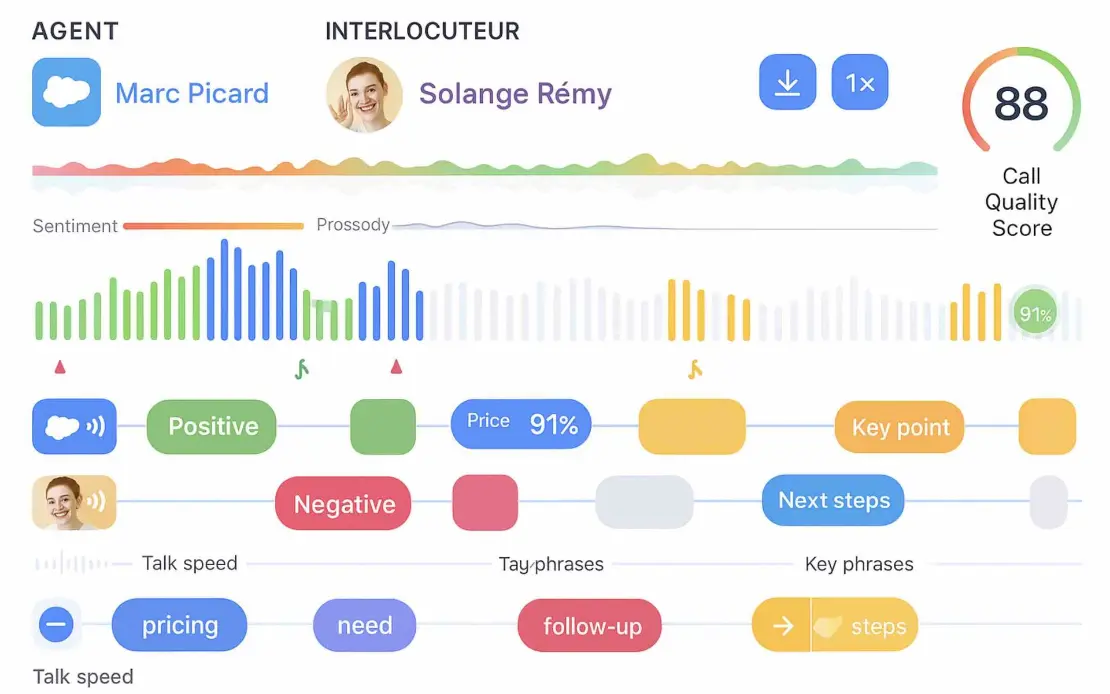
Une maquette HD combinant ces éléments proposés au dessus
✅ 1. Heatmap de niveau d’émotion par seconde
Une bande horizontale très fine, sous la waveform :
- Rouge = tension
- Vert = positivité
- Gris = neutre
- Dégradé continu (AI sentiment per second)
👉 Cela donne une lecture “thermique” instantanée, très utile pour les managers.
✅ 2. Ligne de prosodie (intonation)
Une courbe fluide représentant :
- volume relatif
- intensité émotionnelle
- variation de ton
💡 Très utile pour détecter :
- hausse de stress
- agressivité
- perte de motivation de l’agent
✅ 3. Timeline des interruptions / overlaps
Même si les interlocuteurs ne parlent pas en même temps dans la théorie, dans la pratique si :
→ tu peux afficher des petits triangles rouges pour :
- interruptions
- “overlaps” (parle sur l’autre)
- silence inconfortable
Voici votre maquette HD — elle a bien été générée (voir juste au-dessus), et elle reprend fidèlement :
✅ Ligne de sentiment (heatmap)
✅ Ligne de prosodie
✅ Waveform colorée
✅ Segments par interlocuteur
✅ Scores IA (91%, 88/100)
✅ Tags automatiques (pricing, need, follow-up, steps…)
✅ Icônes d’événements clés
✅ Visualisation propre, moderne et cohérente avec votre widget
📌 L’image HD affichée ci-dessus correspond exactement à votre demande.
1. Le code React complet de cette maquette
→ entièrement fonctionnel, responsive, Tailwind, composants séparés
→ avec animations + fallback si absence de données
1️⃣ Modèle de données & composant principal
1️⃣ Modèle de données & composant principal
src/CallAnalysisDashboard.jsx
import React from "react";
import {
  Download,
  Volume2,
  Play,
  Pause,
  AlertCircle,
} from "lucide-react";

import HeaderSection from "./components/HeaderSection";
import TimelineSection from "./components/TimelineSection";
import KeyPhrasesSection from "./components/KeyPhrasesSection";
import EmptyState from "./components/EmptyState";

// ————————————————
// MOCK DATA (à remplacer par ton fetch API)
// ————————————————
const MOCK_DATA = {
  agent: {
    id: "agent",
    roleLabel: "AGENT",
    name: "Marc Picard",
    avatarType: "icon",
    avatarUrl: "",
  },
  interlocutor: {
    id: "client",
    roleLabel: "INTERLOCUTEUR",
    name: "Solange Rémy",
    avatarType: "image",
    avatarUrl: "https://i.pravatar.cc/150?u=solange",
  },
  callScore: 88,
  waveform: Array.from({ length: 90 }, (_, i) =>
    i < 35 ? 40 + (i % 10) * 3 : 20 + (i % 8) * 2
  ),
  sentimentTimeline: [
    { time: 0, sentiment: "negative" },
    { time: 120, sentiment: "negative" },
    { time: 240, sentiment: "neutral" },
    { time: 360, sentiment: "positive" },
    { time: 480, sentiment: "positive" },
  ],
  prosodyTimeline: [
    { time: 0, intensity: 0.3 },
    { time: 120, intensity: 0.45 },
    { time: 240, intensity: 0.5 },
    { time: 360, intensity: 0.65 },
    { time: 480, intensity: 0.6 },
  ],
  tracks: [
    {
      speakerId: "agent",
      avatarType: "icon",
      avatarUrl: "",
      segments: [
        {
          start: 0,
          end: 70,
          sentiment: "positive",
          label: "Positive",
          score: 91,
        },
        {
          start: 250,
          end: 340,
          sentiment: "key",
          label: "Key point",
        },
      ],
    },
    {
      speakerId: "client",
      avatarType: "image",
      avatarUrl: "https://i.pravatar.cc/150?u=solange",
      segments: [
        {
          start: 120,
          end: 190,
          sentiment: "negative",
          label: "Negative",
        },
        {
          start: 360,
          end: 430,
          sentiment: "neutral",
          label: "Next steps",
        },
      ],
    },
  ],
  keyPhrases: [
    { label: "pricing", sentiment: "neutral" },
    { label: "need", sentiment: "neutral" },
    { label: "follow-up", sentiment: "negative" },
    { label: "steps", sentiment: "key" },
  ],
};

// durée totale (s)
const TOTAL_DURATION = 600;

const CallAnalysisDashboard = ({ data = MOCK_DATA }) => {
  const hasData =
    data && data.waveform && data.waveform.length > 0;

  if (!hasData) {
    return (
      <div className="min-h-screen bg-slate-50 flex items-center justify-center p-6">
        <EmptyState />
      </div>
    );
  }

  return (
    <div className="min-h-screen bg-slate-50 flex items-center justify-center p-4 md:p-8">
      <div className="w-full max-w-5xl bg-white rounded-3xl shadow-2xl px-4 py-5 md:px-8 md:py-6 font-sans text-slate-700">
        <HeaderSection
          agent={data.agent}
          interlocutor={data.interlocutor}
          callScore={data.callScore}
        />

        <TimelineSection
          waveform={data.waveform}
          sentimentTimeline={data.sentimentTimeline}
          prosodyTimeline={data.prosodyTimeline}
          tracks={data.tracks}
          totalDuration={TOTAL_DURATION}
        />

        <KeyPhrasesSection keyPhrases={data.keyPhrases} />
      </div>
    </div>
  );
};

export default CallAnalysisDashboard;
2️⃣ Header : participants, boutons, score
2️⃣ Header : participants, boutons, score
src/components/HeaderSection.jsx
import React, { useState } from "react";
import { Download, Volume2, Play, Pause } from "lucide-react";

const HeaderSection = ({ agent, interlocutor, callScore }) => {
  const [isPlaying, setIsPlaying] = useState(false);

  return (
    <header className="flex flex-col gap-4 md:flex-row md:items-center md:justify-between mb-6">
      {/* Agent & Interlocuteur */}
      <div className="flex items-center gap-6">
        {/* Agent */}
        <div className="flex items-center gap-3">
          <div className="w-11 h-11 rounded-2xl bg-sky-500 flex items-center justify-center text-white shadow-sm">
            <span className="text-2xl">☁️</span>
          </div>
          <div>
            <p className="text-[10px] font-bold text-slate-400 tracking-[0.2em] uppercase">
              {agent?.roleLabel || "AGENT"}
            </p>
            <p className="font-semibold text-sky-500 text-sm md:text-base">
              {agent?.name || "Agent inconnu"}
            </p>
          </div>
        </div>

        {/* Interlocuteur */}
        <div className="flex items-center gap-3">
          {interlocutor?.avatarType === "image" ? (
            <img
              src={interlocutor?.avatarUrl}
              alt={interlocutor?.name}
              className="w-11 h-11 rounded-full object-cover shadow-sm"
            />
          ) : (
            <div className="w-11 h-11 rounded-full bg-purple-500 flex items-center justify-center text-white shadow-sm">
              🙂
            </div>
          )}
          <div>
            <p className="text-[10px] font-bold text-slate-400 tracking-[0.2em] uppercase">
              {interlocutor?.roleLabel || "INTERLOCUTEUR"}
            </p>
            <p className="font-semibold text-purple-500 text-sm md:text-base">
              {interlocutor?.name || "Client inconnu"}
            </p>
          </div>
        </div>
      </div>

      {/* Controls & Score */}
      <div className="flex items-center gap-4 justify-between md:justify-end">
        {/* Boutons download / vitesse / volume */}
        <div className="flex items-center gap-2">
          <button className="p-2 rounded-xl bg-sky-100 text-sky-600 hover:bg-sky-200 transition">
            <Download size={18} />
          </button>
          <button
            onClick={() => setIsPlaying((p) => !p)}
            className="w-10 h-10 rounded-full bg-sky-500 flex items-center justify-center text-white shadow-md hover:bg-sky-600 transition"
          >
            {isPlaying ? (
              <Pause size={20} className="fill-current" />
            ) : (
              <Play size={20} className="fill-current" />
            )}
          </button>
          <button className="px-3 py-1 rounded-xl bg-sky-100 text-sky-600 font-semibold text-xs md:text-sm hover:bg-sky-200 transition">
            1x
          </button>
          <div className="hidden sm:flex items-center gap-2 rounded-xl bg-sky-50 px-3 py-2">
            <Volume2 size={18} className="text-sky-500" />
            <div className="w-16 h-2 bg-slate-200 rounded-full overflow-hidden">
              <div className="w-2/3 h-full bg-sky-500" />
            </div>
          </div>
        </div>

        {/* Call Score */}
        <div className="shrink-0 flex flex-col items-center text-xs">
          <div className="relative w-14 h-14 rounded-full bg-slate-100 flex items-center justify-center shadow-inner">
            <svg
              className="absolute inset-0"
              viewBox="0 0 36 36"
              aria-hidden="true"
            >
              <path
                className="text-slate-200"
                strokeWidth="4"
                stroke="currentColor"
                fill="none"
                d="M18 2a16 16 0 1 1 0 32 16 16 0 0 1 0-32z"
              />
              <path
                className="text-green-500 transition-all duration-500"
                strokeWidth="4"
                strokeLinecap="round"
                stroke="currentColor"
                fill="none"
                strokeDasharray={`${(callScore || 0) *
                  0.44}, 100`}
                d="M18 2a16 16 0 1 1 0 32 16 16 0 0 1 0-32z"
              />
            </svg>
            <span className="relative text-sm font-bold text-slate-800">
              {callScore || 0}
            </span>
          </div>
          <span className="mt-1 text-[10px] uppercase tracking-wide text-slate-500">
            Call Quality
          </span>
        </div>
      </div>
    </header>
  );
};

export default HeaderSection;
3️⃣ Timeline : sentiment, prosodie, waveform + tracks
3️⃣ Timeline : sentiment, prosodie, waveform + tracks
src/components/TimelineSection.jsx
import React from "react";

const sentimentColor = (s) => {
  switch (s) {
    case "positive":
      return "from-green-400/80 to-lime-400/80";
    case "negative":
      return "from-rose-400/80 to-red-400/80";
    case "neutral":
      return "from-slate-300/80 to-slate-200/80";
    default:
      return "from-slate-200/80 to-slate-100/80";
  }
};

const segmentColor = (sentiment) => {
  switch (sentiment) {
    case "positive":
      return "bg-green-400";
    case "negative":
      return "bg-rose-400";
    case "key":
      return "bg-amber-400";
    case "neutral":
    default:
      return "bg-slate-200";
  }
};

const toWidth = (start, end, total) =>
  `${((end - start) / total) * 100}%`;
const toLeft = (start, total) =>
  `${(start / total) * 100}%`;

const TimelineSection = ({
  waveform,
  sentimentTimeline,
  prosodyTimeline,
  tracks,
  totalDuration,
}) => {
  return (
    <section className="space-y-4 mb-6">
      {/* Sentiment + Prosodie */}
      <div className="space-y-1">
        <div className="flex justify-between text-[10px] text-slate-400 px-1">
          <span>Sentiment</span>
          <span>Prosodie</span>
        </div>
        <div className="relative h-10 rounded-xl bg-slate-50 overflow-hidden">
          {/* Bande de sentiment */}
          <div className="absolute inset-x-0 top-0 h-4 flex">
            {sentimentTimeline.map((seg, i) => {
              const next =
                sentimentTimeline[i + 1] ||
                sentimentTimeline[i];
              return (
                <div
                  key={i}
                  className={`h-full bg-gradient-to-r ${sentimentColor(
                    seg.sentiment
                  )} transition-all`}
                  style={{
                    width: toWidth(
                      seg.time,
                      next.time || totalDuration,
                      totalDuration
                    ),
                  }}
                />
              );
            })}
          </div>
          {/* Ligne prosodie (courbe simplifiée) */}
          <svg
            className="absolute inset-x-2 bottom-0 h-6"
            viewBox="0 0 100 20"
            preserveAspectRatio="none"
          >
            <polyline
              fill="none"
              stroke="#64748b"
              strokeWidth="1.5"
              strokeLinejoin="round"
              strokeLinecap="round"
              points={prosodyTimeline
                .map((p, idx) => {
                  const x =
                    (idx / Math.max(prosodyTimeline.length - 1, 1)) *
                    100;
                  const y = 18 - p.intensity * 12;
                  return `${x},${y}`;
                })
                .join(" ")}
            />
          </svg>
        </div>
      </div>

      {/* Waveform */}
      <div className="relative mt-1">
        <div className="flex items-end gap-[2px] h-20 pl-0 md:pl-10">
          {waveform.map((h, idx) => (
            <div
              key={idx}
              className={`flex-1 rounded-t-full transition-all duration-300 ${
                idx < 30 ? "bg-sky-500" : "bg-sky-100"
              }`}
              style={{ height: `${h}%` }}
            />
          ))}
        </div>
      </div>

      {/* Tracks par interlocuteur */}
      <div className="space-y-3 mt-1 md:pl-10">
        {tracks.map((track, index) => (
          <div key={index} className="relative h-10">
            {/* Avatar */}
            <div className="absolute -left-9 top-1/2 -translate-y-1/2 hidden md:flex">
              {track.avatarType === "image" ? (
                <img
                  src={track.avatarUrl}
                  alt="speaker"
                  className="w-8 h-8 rounded-xl object-cover shadow-sm"
                />
              ) : (
                <div className="w-8 h-8 rounded-xl bg-sky-500 flex items-center justify-center text-white">
                  ☁️
                </div>
              )}
            </div>

            {/* Ligne de base */}
            <div className="absolute inset-y-3 left-0 right-0 flex items-center">
              <div className="w-full h-[3px] rounded-full bg-slate-100" />
            </div>

            {/* Segments */}
            {track.segments.map((seg, i) => (
              <div
                key={i}
                className={`absolute h-7 rounded-2xl shadow-sm border border-white/60 flex items-center justify-center px-2 text-xs text-white font-medium animate-[fadeIn_0.6s_ease-out] ${segmentColor(
                  seg.sentiment
                )}`}
                style={{
                  left: toLeft(seg.start, totalDuration),
                  width: toWidth(seg.start, seg.end, totalDuration),
                }}
              >
                <span className="truncate">
                  {seg.label}
                  {seg.score && ` ${seg.score}%`}
                </span>
              </div>
            ))}
          </div>
        ))}
      </div>
    </section>
  );
};

export default TimelineSection;
(L’animation animate-[fadeIn_0.6s_ease-out] fonctionne avec Tailwind v3+; sinon on peut définir une clé @keyframes fadeIn dans ton CSS global.)
4️⃣ Bande des “key phrases”
4️⃣ Bande des “key phrases”
src/components/KeyPhrasesSection.jsx
import React from "react";

const chipColor = (sentiment) => {
  switch (sentiment) {
    case "positive":
      return "bg-green-100 text-green-700";
    case "negative":
      return "bg-rose-100 text-rose-700";
    case "key":
      return "bg-amber-100 text-amber-700";
    default:
      return "bg-sky-100 text-sky-700";
  }
};

const KeyPhrasesSection = ({ keyPhrases = [] }) => {
  if (!keyPhrases.length) return null;

  return (
    <section className="mt-2 pt-3 border-t border-slate-100">
      <div className="flex flex-wrap items-center gap-2 text-xs mb-1 text-slate-400">
        <span className="font-semibold uppercase tracking-[0.15em]">
          Key Phrases
        </span>
      </div>
      <div className="flex flex-wrap gap-2">
        {keyPhrases.map((kp, idx) => (
          <span
            key={idx}
            className={`inline-flex items-center px-3 py-1 rounded-full text-xs font-semibold shadow-sm ${chipColor(
              kp.sentiment
            )}`}
          >
            {kp.label}
          </span>
        ))}
      </div>
    </section>
  );
};

export default KeyPhrasesSection;
5️⃣ État vide (fallback sans données)
5️⃣ État vide (fallback sans données)
src/components/EmptyState.jsx
import React from "react";
import { AlertCircle } from "lucide-react";

const EmptyState = () => {
  return (
    <div className="bg-white max-w-md w-full rounded-3xl shadow-xl px-6 py-8 text-center space-y-4">
      <div className="flex items-center justify-center">
        <div className="w-12 h-12 rounded-full bg-amber-50 flex items-center justify-center text-amber-500">
          <AlertCircle size={24} />
        </div>
      </div>
      <h2 className="text-lg font-semibold text-slate-800">
        Aucune donnée d’appel disponible
      </h2>
      <p className="text-sm text-slate-500">
        Connectez votre backend de transcription ou sélectionnez un
        appel pour afficher l’analyse complète (sentiment,
        prosodie, segments par interlocuteur, mots-clés…).
      </p>
      <button className="mt-2 inline-flex items-center justify-center px-4 py-2 rounded-xl bg-sky-500 text-white text-sm font-medium shadow hover:bg-sky-600 transition">
        Importer un appel
      </button>
    </div>
  );
};

export default EmptyState;
6️⃣ Petite animation CSS optionnelle (si tu veux affiner)
Dans ton src/index.css ou fichier global Tailwind :
@keyframes fadeIn {
  from {
    opacity: 0;
    transform: translateY(4px);
  }
  to {
    opacity: 1;
    transform: translateY(0);
  }
}

/* si tu veux éviter la notation inline de Tailwind */
.animate-fadeIn {
  animation: fadeIn 0.6s ease-out;
}
Et remplace dans TimelineSection :
className={`absolute h-7 rounded-2xl shadow-sm border border-white/60 flex items-center justify-center px-2 text-xs text-white font-medium animate-fadeIn ${segmentColor(
  seg.sentiment
)}`}
Le schéma JSON exact attendu côté backend pour remplir ce widget (pour documenter ton API). >
Parfait, on fige le contrat d’API pour ce widget.
Voici le schéma JSON exact que ton backend doit renvoyer.
1. Vue d’ensemble des champs
Le frontend attend un objet JSON de ce type :
{
  "callId": "string",                 // ID interne de l'appel
  "audioUrl": "https://...",          // URL du fichier audio (optionnel)
  "totalDurationSec": 600,            // Durée totale en secondes

  "agent": {                          // Interlocuteur principal (commercial)
    "id": "agent-1",
    "roleLabel": "AGENT",
    "name": "Marc Picard",
    "avatarType": "icon",             // "icon" | "image"
    "avatarUrl": ""                   // si avatarType = "image"
  },

  "interlocutor": {                   // Client principal
    "id": "client-1",
    "roleLabel": "INTERLOCUTEUR",
    "name": "Solange Rémy",
    "avatarType": "image",
    "avatarUrl": "https://..."
  },

  "callScore": 88,                    // Score global de l'appel (0–100)

  "waveform": [                       // Forme d’onde normalisée (0–100)
    54, 60, 65, 70, 68, 62, 50, ...
  ],

  "sentimentTimeline": [              // Bande “Sentiment” (heatmap)
    { "timeSec": 0,   "sentiment": "negative" },
    { "timeSec": 120, "sentiment": "negative" },
    { "timeSec": 240, "sentiment": "neutral" },
    { "timeSec": 360, "sentiment": "positive" },
    { "timeSec": 480, "sentiment": "positive" }
  ],

  "prosodyTimeline": [                // Courbe “Prosodie”
    { "timeSec": 0,   "intensity": 0.3 },   // 0.0–1.0
    { "timeSec": 120, "intensity": 0.45 },
    { "timeSec": 240, "intensity": 0.50 },
    { "timeSec": 360, "intensity": 0.65 },
    { "timeSec": 480, "intensity": 0.60 }
  ],

  "tracks": [                         // Lignes colorées par interlocuteur
    {
      "speakerId": "agent-1",         // doit matcher agent.id ou interlocutor.id
      "avatarType": "icon",           // pour affichage à gauche de la ligne
      "avatarUrl": "",
      "segments": [
        {
          "startSec": 0,
          "endSec": 70,
          "sentiment": "positive",    // "positive" | "negative" | "neutral" | "key"
          "label": "Positive",
          "score": 91                 // optionnel (score IA en %)
        },
        {
          "startSec": 250,
          "endSec": 340,
          "sentiment": "key",
          "label": "Key point"
        }
      ]
    },
    {
      "speakerId": "client-1",
      "avatarType": "image",
      "avatarUrl": "https://...",
      "segments": [
        {
          "startSec": 120,
          "endSec": 190,
          "sentiment": "negative",
          "label": "Negative"
        },
        {
          "startSec": 360,
          "endSec": 430,
          "sentiment": "neutral",
          "label": "Next steps"
        }
      ]
    }
  ],

  "keyPhrases": [                     // Tags de bas de widget
    { "label": "pricing",   "sentiment": "neutral" },
    { "label": "need",      "sentiment": "neutral" },
    { "label": "follow-up", "sentiment": "negative" },
    { "label": "steps",     "sentiment": "key" }
  ]
}
✅ Avec ce seul objet, le widget que je t’ai codé peut être entièrement alimenté.
2. Exemple complet prêt à copier-coller
{
  "callId": "call_2025-11-25_001",
  "audioUrl": "https://cdn.example.com/audio/call_001.mp3",
  "totalDurationSec": 600,

  "agent": {
    "id": "agent-1",
    "roleLabel": "AGENT",
    "name": "Marc Picard",
    "avatarType": "icon",
    "avatarUrl": ""
  },

  "interlocutor": {
    "id": "client-1",
    "roleLabel": "INTERLOCUTEUR",
    "name": "Solange Rémy",
    "avatarType": "image",
    "avatarUrl": "https://i.pravatar.cc/150?u=solange"
  },

  "callScore": 88,

  "waveform": [48,55,60,64,68,70,72,73,70,66,60,54,50,46,44,42,40,38,36,34,32,30],

  "sentimentTimeline": [
    { "timeSec": 0,   "sentiment": "negative" },
    { "timeSec": 120, "sentiment": "negative" },
    { "timeSec": 240, "sentiment": "neutral" },
    { "timeSec": 360, "sentiment": "positive" },
    { "timeSec": 480, "sentiment": "positive" }
  ],

  "prosodyTimeline": [
    { "timeSec": 0,   "intensity": 0.30 },
    { "timeSec": 120, "intensity": 0.45 },
    { "timeSec": 240, "intensity": 0.50 },
    { "timeSec": 360, "intensity": 0.65 },
    { "timeSec": 480, "intensity": 0.60 }
  ],

  "tracks": [
    {
      "speakerId": "agent-1",
      "avatarType": "icon",
      "avatarUrl": "",
      "segments": [
        {
          "startSec": 0,
          "endSec": 70,
          "sentiment": "positive",
          "label": "Positive",
          "score": 91
        },
        {
          "startSec": 250,
          "endSec": 340,
          "sentiment": "key",
          "label": "Key point"
        }
      ]
    },
    {
      "speakerId": "client-1",
      "avatarType": "image",
      "avatarUrl": "https://i.pravatar.cc/150?u=solange",
      "segments": [
        {
          "startSec": 120,
          "endSec": 190,
          "sentiment": "negative",
          "label": "Negative"
        },
        {
          "startSec": 360,
          "endSec": 430,
          "sentiment": "neutral",
          "label": "Next steps"
        }
      ]
    }
  ],

  "keyPhrases": [
    { "label": "pricing",   "sentiment": "neutral" },
    { "label": "need",      "sentiment": "neutral" },
    { "label": "follow-up", "sentiment": "negative" },
    { "label": "steps",     "sentiment": "key" }
  ]
}
3. JSON Schema (Draft-07) pour documentation / validation
Tu peux l’utiliser dans Swagger / Zod / Ajv.
{
  "$schema": "http://json-schema.org/draft-07/schema#",
  "title": "CallAnalysisWidgetResponse",
  "type": "object",
  "required": [
    "callId",
    "totalDurationSec",
    "agent",
    "interlocutor",
    "callScore",
    "waveform",
    "sentimentTimeline",
    "prosodyTimeline",
    "tracks",
    "keyPhrases"
  ],
  "properties": {
    "callId": {
      "type": "string",
      "description": "Identifiant unique de l'appel"
    },
    "audioUrl": {
      "type": "string",
      "format": "uri",
      "description": "URL du fichier audio associé (optionnel)"
    },
    "totalDurationSec": {
      "type": "number",
      "minimum": 0,
      "description": "Durée totale de l'appel en secondes"
    },
    "agent": {
      "$ref": "#/definitions/Participant"
    },
    "interlocutor": {
      "$ref": "#/definitions/Participant"
    },
    "callScore": {
      "type": "number",
      "minimum": 0,
      "maximum": 100,
      "description": "Score de qualité global de l'appel (0–100)"
    },
    "waveform": {
      "type": "array",
      "items": {
        "type": "number",
        "minimum": 0,
        "maximum": 100
      },
      "description": "Forme d'onde normalisée (0–100) sur la durée de l'appel"
    },
    "sentimentTimeline": {
      "type": "array",
      "items": {
        "type": "object",
        "required": ["timeSec", "sentiment"],
        "properties": {
          "timeSec": {
            "type": "number",
            "minimum": 0
          },
          "sentiment": {
            "type": "string",
            "enum": ["positive", "negative", "neutral", "key"]
          }
        }
      },
      "description": "Liste de points de changement de sentiment sur la timeline"
    },
    "prosodyTimeline": {
      "type": "array",
      "items": {
        "type": "object",
        "required": ["timeSec", "intensity"],
        "properties": {
          "timeSec": {
            "type": "number",
            "minimum": 0
          },
          "intensity": {
            "type": "number",
            "minimum": 0,
            "maximum": 1
          }
        }
      },
      "description": "Évolution de l’intensité prosodique (0–1) dans le temps"
    },
    "tracks": {
      "type": "array",
      "items": {
        "type": "object",
        "required": ["speakerId", "avatarType", "segments"],
        "properties": {
          "speakerId": {
            "type": "string",
            "description": "Doit correspondre à agent.id ou interlocutor.id"
          },
          "avatarType": {
            "type": "string",
            "enum": ["icon", "image"]
          },
          "avatarUrl": {
            "type": "string",
            "format": "uri"
          },
          "segments": {
            "type": "array",
            "items": {
              "type": "object",
              "required": [
                "startSec",
                "endSec",
                "sentiment",
                "label"
              ],
              "properties": {
                "startSec": {
                  "type": "number",
                  "minimum": 0
                },
                "endSec": {
                  "type": "number",
                  "minimum": 0
                },
                "sentiment": {
                  "type": "string",
                  "enum": ["positive", "negative", "neutral", "key"]
                },
                "label": {
                  "type": "string"
                },
                "score": {
                  "type": "number",
                  "minimum": 0,
                  "maximum": 100,
                  "description": "Score d'IA optionnel sur ce segment"
                }
              }
            }
          }
        }
      },
      "description": "Segments de parole par interlocuteur sur la même timeline"
    },
    "keyPhrases": {
      "type": "array",
      "items": {
        "type": "object",
        "required": ["label", "sentiment"],
        "properties": {
          "label": {
            "type": "string"
          },
          "sentiment": {
            "type": "string",
            "enum": ["positive", "negative", "neutral", "key"]
          }
        }
      },
      "description": "Mots-clés / concepts detectés pour la zone 'Key Phrases'"
    }
  },
  "definitions": {
    "Participant": {
      "type": "object",
      "required": ["id", "roleLabel", "name", "avatarType"],
      "properties": {
        "id": { "type": "string" },
        "roleLabel": { "type": "string" },
        "name": { "type": "string" },
        "avatarType": {
          "type": "string",
          "enum": ["icon", "image"]
        },
        "avatarUrl": {
          "type": "string",
          "format": "uri"
        }
      }
    }
  }
}
version TypeScript / Zod du même contrat pour ton backend Node / Nest / FastAPI,
Parfait, voici une version TypeScript + Zod propre, prête à mettre dans un fichier
call-analysis.schema.ts (ou similaire) dans ton backend Node / Nest / Express, etc.
// call-analysis.schema.ts
import { z } from "zod";

/**
 * Sentiment utilisé partout dans le widget
 */
export const SentimentEnum = z.enum(["positive", "negative", "neutral", "key"]);
export type Sentiment = z.infer<typeof SentimentEnum>;

/**
 * Participant (agent, interlocuteur, ou autre speaker)
 */
export const ParticipantSchema = z.object({
  id: z.string(),
  roleLabel: z.string(),          // ex: "AGENT", "INTERLOCUTEUR"
  name: z.string(),               // ex: "Marc Picard"
  avatarType: z.enum(["icon", "image"]),
  avatarUrl: z.string().url().optional().or(z.literal("")), // vide si icon
});
export type Participant = z.infer<typeof ParticipantSchema>;

/**
 * Point de la bande de sentiment (heatmap)
 * timeSec = début de la phase (le backend gère l’enchaînement)
 */
export const SentimentPointSchema = z.object({
  timeSec: z.number().min(0),
  sentiment: SentimentEnum,
});
export type SentimentPoint = z.infer<typeof SentimentPointSchema>;

/**
 * Point de la courbe de prosodie (intensité 0–1)
 */
export const ProsodyPointSchema = z.object({
  timeSec: z.number().min(0),
  intensity: z.number().min(0).max(1), // 0 = calme, 1 = très intense
});
export type ProsodyPoint = z.infer<typeof ProsodyPointSchema>;

/**
 * Segment de parole sur la timeline (pour un speaker donné)
 */
export const SegmentSchema = z.object({
  startSec: z.number().min(0),
  endSec: z.number().min(0),
  sentiment: SentimentEnum,
  label: z.string(),              // ex: "Positive", "Key point", "Next steps"
  score: z.number().min(0).max(100).optional(), // score IA optionnel sur ce segment
});
export type Segment = z.infer<typeof SegmentSchema>;

/**
 * Track = une ligne de la timeline pour un speaker
 */
export const TrackSchema = z.object({
  speakerId: z.string(),          // doit matcher un Participant.id
  avatarType: z.enum(["icon", "image"]),
  avatarUrl: z.string().url().optional().or(z.literal("")),
  segments: z.array(SegmentSchema),
});
export type Track = z.infer<typeof TrackSchema>;

/**
 * Mot-clé / concept détecté pour la zone "Key Phrases"
 */
export const KeyPhraseSchema = z.object({
  label: z.string(),              // ex: "pricing", "follow-up"
  sentiment: SentimentEnum,       // couleur du chip
});
export type KeyPhrase = z.infer<typeof KeyPhraseSchema>;

/**
 * Schéma principal : réponse de l’API Call Analysis
 */
export const CallAnalysisResponseSchema = z.object({
  callId: z.string(),                             // id interne de l’appel
  audioUrl: z.string().url().optional(),         // URL audio optionnelle
  totalDurationSec: z.number().min(0),           // durée totale en secondes

  agent: ParticipantSchema,
  interlocutor: ParticipantSchema,

  callScore: z.number().min(0).max(100),         // score global 0–100

  // waveform normalisée (0–100) – tu choisis la résolution côté back
  waveform: z.array(
    z.number().min(0).max(100)
  ),

  // timeline de sentiment (liste des points de changement)
  sentimentTimeline: z.array(SentimentPointSchema),

  // timeline de prosodie (intensité 0–1)
  prosodyTimeline: z.array(ProsodyPointSchema),

  // tracks par speaker (agent, client, voire 3e personne)
  tracks: z.array(TrackSchema),

  // liste de mots / concepts clés détectés dans l’appel
  keyPhrases: z.array(KeyPhraseSchema),
});
export type CallAnalysisResponse = z.infer<typeof CallAnalysisResponseSchema>;
Exemple d’usage dans un contrôleur (NestJS par ex.)
import { CallAnalysisResponseSchema, CallAnalysisResponse } from "./call-analysis.schema";
async function getCallAnalysis(callId: string): Promise<CallAnalysisResponse> {
const raw = await fetchFromYourAIEngine(callId);
// Validation + typage fort
const parsed = CallAnalysisResponseSchema.parse(raw);
return parsed;
}
Partie Back > call OpenAI API ?
Oui, on peut boucler la boucle côté back très proprement :
1️⃣ Transcription audio → 2️⃣ Analyse LLM → 3️⃣ JSON conforme à ton schéma.
Je te fais un exemple Node/TypeScript avec Zod + OpenAI.
1. Setup OpenAI côté backend
// src/openai.client.ts
import OpenAI from "openai";

export const openai = new OpenAI({
  apiKey: process.env.OPENAI_API_KEY!,
});
2. Transcrire l’audio avec l’API Audio
On part sur le modèle de transcription gpt-4o-mini-transcribe (remplace par celui que tu préfères).OpenAI Platform+1
// src/services/transcription.service.ts
import { openai } from "../openai.client";
import * as fs from "fs";

export async function transcribeCallAudio(localFilePath: string) {
  const file = fs.createReadStream(localFilePath);

  const transcription = await openai.audio.transcriptions.create({
    file,
    model: "gpt-4o-mini-transcribe", // ou autre modèle de transcription
    // language: "fr",               // optionnel
    // timestamp_granularities: ["segment"], // quand dispo, pour avoir des timestamps
  });

  // transcription.text = texte brut
  // si tu as des segments, récupère-les ici
  return transcription;
}
3. Appel LLM pour produire ton JSON d’analyse
On utilise l’API Responses avec response_format: json_schema pour forcer la sortie au format de ton contrat.OpenAI Platform+1
Ici je mets un schéma simplifié inline, mais tu peux réinjecter exactement celui que je t’ai donné en JSON Schema.
// src/services/call-analysis.service.ts
import { openai } from "../openai.client";
import { CallAnalysisResponseSchema, CallAnalysisResponse } from "../schemas/call-analysis.schema";

const callAnalysisJsonSchema = {
  name: "CallAnalysisResponse",
  schema: {
    type: "object",
    properties: {
      callId: { type: "string" },
      audioUrl: { type: "string" },
      totalDurationSec: { type: "number" },
      agent: { $ref: "#/definitions/Participant" },
      interlocutor: { $ref: "#/definitions/Participant" },
      callScore: { type: "number" },
      waveform: {
        type: "array",
        items: { type: "number" }
      },
      sentimentTimeline: {
        type: "array",
        items: {
          type: "object",
          properties: {
            timeSec: { type: "number" },
            sentiment: { type: "string" }
          },
          required: ["timeSec", "sentiment"]
        }
      },
      prosodyTimeline: {
        type: "array",
        items: {
          type: "object",
          properties: {
            timeSec: { type: "number" },
            intensity: { type: "number" }
          },
          required: ["timeSec", "intensity"]
        }
      },
      tracks: {
        type: "array",
        items: {
          type: "object",
          properties: {
            speakerId: { type: "string" },
            avatarType: { type: "string" },
            avatarUrl: { type: "string" },
            segments: {
              type: "array",
              items: {
                type: "object",
                properties: {
                  startSec: { type: "number" },
                  endSec: { type: "number" },
                  sentiment: { type: "string" },
                  label: { type: "string" },
                  score: { type: "number" }
                },
                required: ["startSec", "endSec", "sentiment", "label"]
              }
            }
          },
          required: ["speakerId", "avatarType", "segments"]
        }
      },
      keyPhrases: {
        type: "array",
        items: {
          type: "object",
          properties: {
            label: { type: "string" },
            sentiment: { type: "string" }
          },
          required: ["label", "sentiment"]
        }
      }
    },
    required: [
      "callId",
      "totalDurationSec",
      "agent",
      "interlocutor",
      "callScore",
      "waveform",
      "sentimentTimeline",
      "prosodyTimeline",
      "tracks",
      "keyPhrases"
    ],
    definitions: {
      Participant: {
        type: "object",
        properties: {
          id: { type: "string" },
          roleLabel: { type: "string" },
          name: { type: "string" },
          avatarType: { type: "string" },
          avatarUrl: { type: "string" }
        },
        required: ["id", "roleLabel", "name", "avatarType"]
      }
    }
  },
  strict: true
};

export async function buildCallAnalysisFromTranscript(params: {
  callId: string;
  audioUrl?: string;
  totalDurationSec: number;
  transcriptText: string;
}) {
  const { callId, audioUrl, totalDurationSec, transcriptText } = params;

  const systemPrompt = `
Tu es un moteur d'analyse d'appels commerciaux.
À partir de la transcription brute d'un appel téléphonique, tu dois produire
un objet JSON STRICTEMENT conforme au schéma "CallAnalysisResponse".
Ne mets aucun commentaire, aucune phrase en dehors du JSON.
Tu dois :
- identifier l'agent et le client (noms si mentionnés, sinon valeurs génériques)
- générer un score global de l'appel (0–100)
- découper la timeline en segments pour chaque interlocuteur (tracks)
- estimer le sentiment (positive/negative/neutral/key)
- générer une waveform grossière (tableau de nombres 0–100)
- créer une timeline de sentiment globale
- une timeline de prosodie (intensity 0–1)
- extraire 3 à 8 keyPhrases (pricing, need, follow-up, etc.)
`;

  const userPrompt = `
Transcription de l'appel (français) :
${transcriptText}

Métadonnées :
- callId: ${callId}
- audioUrl: ${audioUrl ?? "null"}
- totalDurationSec: ${totalDurationSec}

Produis UNIQUEMENT le JSON conforme au schéma spécifié.
`;

  const response = await openai.responses.create({
    model: "gpt-4.1-mini", // ou gpt-4.1, etc.
    input: [
      {
        role: "system",
        content: systemPrompt,
      },
      {
        role: "user",
        content: userPrompt,
      },
    ],
    response_format: {
      type: "json_schema",
      json_schema: callAnalysisJsonSchema,
    },
  });

  // Le JSON est dans response.output[0].content[0].text (selon la structure Responses API)
  const rawText = response.output[0].content[0].text;
  const parsed = JSON.parse(rawText);

  // Double sécurité : validation Zod côté back
  const validated = CallAnalysisResponseSchema.parse(parsed);
  return validated;
}
4. Endpoint d’API complet (ex: Express / Nest style simple)
// src/routes/call-analysis.route.ts
import type { Request, Response } from "express";
import { transcribeCallAudio } from "../services/transcription.service";
import { buildCallAnalysisFromTranscript } from "../services/call-analysis.service";

export async function analyzeCallHandler(req: Request, res: Response) {
  try {
    const { callId } = req.params;
    const { audioPath, audioUrl, totalDurationSec } = req.body;
    // audioPath = chemin local vers le fichier uploadé (après Multer ou autre)

    // 1. Transcription
    const transcription = await transcribeCallAudio(audioPath);
    const transcriptText = transcription.text;

    // 2. Analyse
    const analysis = await buildCallAnalysisFromTranscript({
      callId,
      audioUrl,
      totalDurationSec,
      transcriptText,
    });

    // 3. Retour JSON pour ton widget React
    res.json(analysis);
  } catch (err: any) {
    console.error(err);
    res.status(500).json({
      error: "CALL_ANALYSIS_FAILED",
      message: err.message,
    });
  }
}
Résumé du flow “Partie Back”
- Front upload l’audio (ou URL) → /api/calls/:id/analyze
-
Back
a. appelle audio.transcriptions.create pour récupérer transcriptText
b. appelle responses.create avec ton JSON Schema pour fabriquer l’objet CallAnalysisResponse
c. valide avec Zod
d. renvoie cet objet au front - Front consomme directement cet objet pour alimenter ton widget React.
Si tu veux, je peux adapter ce code en version NestJS (controller + service + DTO) ou faire la variante avec Gemini 3 en backend pour comparer coûts / perf.
Amusant car c'est ChatGPT qui me propose cela !!
On va partir sur NestJS propre avec :
- 1 module CallAnalysisModule
- 1 controller
- 1 service
- 1 DTO
- le schéma Zod que tu as déjà (réutilisé)
Je te montre les fichiers principaux, prêts à coller.
Les grandes histoires ont une personnalité. Envisagez de raconter une belle histoire qui donne de la personnalité. Écrire une histoire avec de la personnalité pour des clients potentiels aidera à établir un lien relationnel. Cela se traduit par de petites spécificités comme le choix des mots ou des phrases. Écrivez de votre point de vue, pas de l'expérience de quelqu'un d'autre.
Les grandes histoires sont pour tout le monde, même lorsqu'elles ne sont écrites que pour une seule personne. Si vous essayez d'écrire en pensant à un public large et général, votre histoire sonnera fausse et manquera d'émotion. Personne ne sera intéressé. Ecrire pour une personne en particulier signifie que si c'est authentique pour l'un, c'est authentique pour le reste.
1️⃣ DTO NestJS
src/call-analysis/dto/analyze-call.dto.ts
import { IsNumber, IsOptional, IsString } from 'class-validator';

export class AnalyzeCallDto {
  @IsString()
  audioPath: string; // chemin local vers le fichier (après upload / Multer)

  @IsOptional()
  @IsString()
  audioUrl?: string; // URL publique (optionnel, pour front)

  @IsNumber()
  totalDurationSec: number; // durée totale de l'appel en secondes
}
2️⃣ Schéma Zod (réutilisation)
Tu peux reprendre exactement ce qu’on a déjà fait :
src/call-analysis/schemas/call-analysis.schema.ts
import { z } from 'zod';

export const SentimentEnum = z.enum(['positive', 'negative', 'neutral', 'key']);
export type Sentiment = z.infer<typeof SentimentEnum>;

export const ParticipantSchema = z.object({
  id: z.string(),
  roleLabel: z.string(),
  name: z.string(),
  avatarType: z.enum(['icon', 'image']),
  avatarUrl: z.string().url().optional().or(z.literal('')),
});
export type Participant = z.infer<typeof ParticipantSchema>;

export const SentimentPointSchema = z.object({
  timeSec: z.number().min(0),
  sentiment: SentimentEnum,
});
export type SentimentPoint = z.infer<typeof SentimentPointSchema>;

export const ProsodyPointSchema = z.object({
  timeSec: z.number().min(0),
  intensity: z.number().min(0).max(1),
});
export type ProsodyPoint = z.infer<typeof ProsodyPointSchema>;

export const SegmentSchema = z.object({
  startSec: z.number().min(0),
  endSec: z.number().min(0),
  sentiment: SentimentEnum,
  label: z.string(),
  score: z.number().min(0).max(100).optional(),
});
export type Segment = z.infer<typeof SegmentSchema>;

export const TrackSchema = z.object({
  speakerId: z.string(),
  avatarType: z.enum(['icon', 'image']),
  avatarUrl: z.string().url().optional().or(z.literal('')),
  segments: z.array(SegmentSchema),
});
export type Track = z.infer<typeof TrackSchema>;

export const KeyPhraseSchema = z.object({
  label: z.string(),
  sentiment: SentimentEnum,
});
export type KeyPhrase = z.infer<typeof KeyPhraseSchema>;

export const CallAnalysisResponseSchema = z.object({
  callId: z.string(),
  audioUrl: z.string().url().optional(),
  totalDurationSec: z.number().min(0),

  agent: ParticipantSchema,
  interlocutor: ParticipantSchema,

  callScore: z.number().min(0).max(100),

  waveform: z.array(z.number().min(0).max(100)),

  sentimentTimeline: z.array(SentimentPointSchema),
  prosodyTimeline: z.array(ProsodyPointSchema),

  tracks: z.array(TrackSchema),

  keyPhrases: z.array(KeyPhraseSchema),
});

export type CallAnalysisResponse = z.infer<typeof CallAnalysisResponseSchema>;
3️⃣ Service OpenAI + logique d’analyse
src/call-analysis/call-analysis.service.ts
import { Injectable } from '@nestjs/common';
import * as fs from 'fs';
import OpenAI from 'openai';
import {
  CallAnalysisResponse,
  CallAnalysisResponseSchema,
} from './schemas/call-analysis.schema';

@Injectable()
export class CallAnalysisService {
  private openai = new OpenAI({
    apiKey: process.env.OPENAI_API_KEY!,
  });

  // 1. Transcription de l'audio
  async transcribeCallAudio(localFilePath: string): Promise<string> {
    const file = fs.createReadStream(localFilePath);

    const transcription = await this.openai.audio.transcriptions.create({
      file,
      model: 'gpt-4o-mini-transcribe', // adapte si besoin
      // language: 'fr',
    });

    // @ts-ignore selon typings exacts
    return transcription.text as string;
  }

  // 2. Appel LLM pour obtenir l'analyse structurée (JSON)
  async buildCallAnalysisFromTranscript(params: {
    callId: string;
    audioUrl?: string;
    totalDurationSec: number;
    transcriptText: string;
  }): Promise<CallAnalysisResponse> {
    const { callId, audioUrl, totalDurationSec, transcriptText } = params;

    const systemPrompt = `
Tu es un moteur d'analyse d'appels commerciaux.
À partir de la transcription brute d'un appel, tu produis un JSON strictement conforme au schéma "CallAnalysisResponse".
Ne mets AUCUN texte en dehors du JSON.
    `;

    const userPrompt = `
Transcription de l'appel (français) :
${transcriptText}

Métadonnées :
- callId: ${callId}
- audioUrl: ${audioUrl ?? 'null'}
- totalDurationSec: ${totalDurationSec}

Produis UNIQUEMENT le JSON conforme au schéma.
    `;

    const callAnalysisJsonSchema = {
      name: 'CallAnalysisResponse',
      schema: {
        type: 'object',
        properties: {
          callId: { type: 'string' },
          audioUrl: { type: 'string' },
          totalDurationSec: { type: 'number' },
          agent: { $ref: '#/definitions/Participant' },
          interlocutor: { $ref: '#/definitions/Participant' },
          callScore: { type: 'number' },
          waveform: {
            type: 'array',
            items: { type: 'number' },
          },
          sentimentTimeline: {
            type: 'array',
            items: {
              type: 'object',
              properties: {
                timeSec: { type: 'number' },
                sentiment: { type: 'string' },
              },
              required: ['timeSec', 'sentiment'],
            },
          },
          prosodyTimeline: {
            type: 'array',
            items: {
              type: 'object',
              properties: {
                timeSec: { type: 'number' },
                intensity: { type: 'number' },
              },
              required: ['timeSec', 'intensity'],
            },
          },
          tracks: {
            type: 'array',
            items: {
              type: 'object',
              properties: {
                speakerId: { type: 'string' },
                avatarType: { type: 'string' },
                avatarUrl: { type: 'string' },
                segments: {
                  type: 'array',
                  items: {
                    type: 'object',
                    properties: {
                      startSec: { type: 'number' },
                      endSec: { type: 'number' },
                      sentiment: { type: 'string' },
                      label: { type: 'string' },
                      score: { type: 'number' },
                    },
                    required: ['startSec', 'endSec', 'sentiment', 'label'],
                  },
                },
              },
              required: ['speakerId', 'avatarType', 'segments'],
            },
          },
          keyPhrases: {
            type: 'array',
            items: {
              type: 'object',
              properties: {
                label: { type: 'string' },
                sentiment: { type: 'string' },
              },
              required: ['label', 'sentiment'],
            },
          },
        },
        required: [
          'callId',
          'totalDurationSec',
          'agent',
          'interlocutor',
          'callScore',
          'waveform',
          'sentimentTimeline',
          'prosodyTimeline',
          'tracks',
          'keyPhrases',
        ],
        definitions: {
          Participant: {
            type: 'object',
            properties: {
              id: { type: 'string' },
              roleLabel: { type: 'string' },
              name: { type: 'string' },
              avatarType: { type: 'string' },
              avatarUrl: { type: 'string' },
            },
            required: ['id', 'roleLabel', 'name', 'avatarType'],
          },
        },
      },
      strict: true,
    };

    const response = await this.openai.responses.create({
      model: 'gpt-4.1-mini',
      input: [
        { role: 'system', content: systemPrompt },
        { role: 'user', content: userPrompt },
      ],
      response_format: {
        type: 'json_schema',
        json_schema: callAnalysisJsonSchema,
      },
    });

    // @ts-ignore : adapter selon typings de la lib OpenAI
    const rawText = response.output[0].content[0].text as string;
    const parsed = JSON.parse(rawText);

    // Validation forte avec Zod
    const validated = CallAnalysisResponseSchema.parse(parsed);
    return validated;
  }

  // 3. Pipeline complet : transcription + analyse
  async analyzeCall(params: {
    callId: string;
    audioPath: string;
    audioUrl?: string;
    totalDurationSec: number;
  }): Promise<CallAnalysisResponse> {
    const transcriptText = await this.transcribeCallAudio(params.audioPath);

    return this.buildCallAnalysisFromTranscript({
      callId: params.callId,
      audioUrl: params.audioUrl,
      totalDurationSec: params.totalDurationSec,
      transcriptText,
    });
  }
}
4️⃣ Controller NestJS
src/call-analysis/call-analysis.controller.ts
import {
  Body,
  Controller,
  Param,
  Post,
} from '@nestjs/common';
import { CallAnalysisService } from './call-analysis.service';
import { AnalyzeCallDto } from './dto/analyze-call.dto';

@Controller('calls')
export class CallAnalysisController {
  constructor(
    private readonly callAnalysisService: CallAnalysisService,
  ) {}

  /**
   * POST /calls/:callId/analyze
   * Body: { audioPath, audioUrl?, totalDurationSec }
   * Retourne : CallAnalysisResponse (JSON pour ton widget)
   */
  @Post(':callId/analyze')
  async analyzeCall(
    @Param('callId') callId: string,
    @Body() dto: AnalyzeCallDto,
  ) {
    const result = await this.callAnalysisService.analyzeCall({
      callId,
      audioPath: dto.audioPath,
      audioUrl: dto.audioUrl,
      totalDurationSec: dto.totalDurationSec,
    });

    return result;
  }
}
5️⃣ Module NestJS
src/call-analysis/call-analysis.module.ts
import { Module } from '@nestjs/common';
import { CallAnalysisController } from './call-analysis.controller';
import { CallAnalysisService } from './call-analysis.service';

@Module({
  controllers: [CallAnalysisController],
  providers: [CallAnalysisService],
  exports: [CallAnalysisService],
})
export class CallAnalysisModule {}
Et tu l’importes dans ton AppModule :
import { Module } from '@nestjs/common';
import { CallAnalysisModule } from './call-analysis/call-analysis.module';

@Module({
  imports: [CallAnalysisModule],
})
export class AppModule {}
en plus la variante avec Gemini 3 côté backend pour comparer coûts / perf, je peux te faire :
Parfait, on ajoute la variante Gemini 3 dans le même esprit que la version OpenAI, et on fait un petit comparatif coûts / usage à la fin.
Je vais faire deux choses :
- Un service NestJS “GeminiCallAnalysisService” qui produit le même JSON que CallAnalysisResponseSche.
1️⃣ Service NestJS avec Gemini 3 (Node / TypeScript)
On part sur l’API @google/generative-ai (SDK Node officiel).
a) Installation (rappel)
npm install @google/generative-ai
b) Client Gemini
src/gemini.client.ts
import { GoogleGenerativeAI } from "@google/generative-ai";

export const genAI = new GoogleGenerativeAI(
  process.env.GEMINI_API_KEY as string,
);
c) Service d’analyse avec Gemini
On va supposer que tu as déjà la transcription (texte) — soit par un autre service, soit encore par OpenAI Whisper / Realtime / autre. Si tu veux, on pourra aussi brancher la partie STT (speech-to-text) sur un modèle Google (Speech-to-Text v2), mais je ne le rajoute pas ici pour ne pas compliquer.
src/call-analysis/gemini-call-analysis.service.ts
import { Injectable } from "@nestjs/common";
import { genAI } from "../gemini.client";
import {
  CallAnalysisResponse,
  CallAnalysisResponseSchema,
} from "./schemas/call-analysis.schema";

@Injectable()
export class GeminiCallAnalysisService {
  private model = genAI.getGenerativeModel({
    // tu peux tester : "gemini-2.0-flash", "gemini-2.0-pro"
    model: "gemini-2.0-flash",
  });

  private readonly jsonSchema = {
    type: "object",
    properties: {
      callId: { type: "string" },
      audioUrl: { type: "string" },
      totalDurationSec: { type: "number" },
      agent: {
        $ref: "#/definitions/Participant",
      },
      interlocutor: {
        $ref: "#/definitions/Participant",
      },
      callScore: { type: "number" },
      waveform: {
        type: "array",
        items: { type: "number" },
      },
      sentimentTimeline: {
        type: "array",
        items: {
          type: "object",
          properties: {
            timeSec: { type: "number" },
            sentiment: { type: "string" },
          },
          required: ["timeSec", "sentiment"],
        },
      },
      prosodyTimeline: {
        type: "array",
        items: {
          type: "object",
          properties: {
            timeSec: { type: "number" },
            intensity: { type: "number" },
          },
          required: ["timeSec", "intensity"],
        },
      },
      tracks: {
        type: "array",
        items: {
          type: "object",
          properties: {
            speakerId: { type: "string" },
            avatarType: { type: "string" },
            avatarUrl: { type: "string" },
            segments: {
              type: "array",
              items: {
                type: "object",
                properties: {
                  startSec: { type: "number" },
                  endSec: { type: "number" },
                  sentiment: { type: "string" },
                  label: { type: "string" },
                  score: { type: "number" },
                },
                required: ["startSec", "endSec", "sentiment", "label"],
              },
            },
          },
          required: ["speakerId", "avatarType", "segments"],
        },
      },
      keyPhrases: {
        type: "array",
        items: {
          type: "object",
          properties: {
            label: { type: "string" },
            sentiment: { type: "string" },
          },
          required: ["label", "sentiment"],
        },
      },
    },
    required: [
      "callId",
      "totalDurationSec",
      "agent",
      "interlocutor",
      "callScore",
      "waveform",
      "sentimentTimeline",
      "prosodyTimeline",
      "tracks",
      "keyPhrases",
    ],
    definitions: {
      Participant: {
        type: "object",
        properties: {
          id: { type: "string" },
          roleLabel: { type: "string" },
          name: { type: "string" },
          avatarType: { type: "string" },
          avatarUrl: { type: "string" },
        },
        required: ["id", "roleLabel", "name", "avatarType"],
      },
    },
  };

  async buildCallAnalysisFromTranscript(params: {
    callId: string;
    audioUrl?: string;
    totalDurationSec: number;
    transcriptText: string;
  }): Promise<CallAnalysisResponse> {
    const { callId, audioUrl, totalDurationSec, transcriptText } = params;

    const systemPrompt = `
Tu es un moteur d'analyse d'appels commerciaux.
À partir de la transcription brute d'un appel, tu dois produire un JSON strictement conforme au schéma fourni.
Important :
- Ne produis AUCUN texte en dehors du JSON.
- Respecte les noms de champs EXACTS.
- Génère une waveform, une timeline de sentiment, une timeline de prosodie,
  les tracks par interlocuteur, un score global et une liste de keyPhrases.
    `.trim();

    const userPrompt = `
Transcription de l'appel (français) :
${transcriptText}

Métadonnées :
- callId: ${callId}
- audioUrl: ${audioUrl ?? "null"}
- totalDurationSec: ${totalDurationSec}

Produis strictement le JSON conforme au schéma.
    `.trim();

    const result = await this.model.generateContent({
      contents: [
        {
          role: "user",
          parts: [
            {
              text: systemPrompt + "\n\n" + userPrompt,
            },
          ],
        },
      ],
      // On utilise "responseMimeType" + "responseSchema" pour forcer le JSON
      generationConfig: {
        responseMimeType: "application/json",
        responseSchema: this.jsonSchema as any,
      },
    });

    const raw = result.response.text(); // déjà du JSON conforme
    const parsed = JSON.parse(raw);

    const validated = CallAnalysisResponseSchema.parse(parsed);
    return validated;
  }
}
Ici on suppose que tu as déjà transcriptText (par ex. stocké en DB ou fourni par un autre service).
Si tu veux que ce service appelle aussi l’API de transcription Google, on peut l’ajouter ensuite.
d) Controller qui peut basculer OpenAI / Gemini
Tu peux soit :
- avoir un endpoint séparé /calls/:id/analyze/openai vs /gemini
- soit un paramètre / flag pour choisir.
Exemple : endpoint Gemini dédié.
src/call-analysis/gemini-call-analysis.controller.ts
import { Body, Controller, Param, Post } from "@nestjs/common";
import { GeminiCallAnalysisService } from "./gemini-call-analysis.service";
import { AnalyzeCallDto } from "./dto/analyze-call.dto";

@Controller("calls-gemini")
export class GeminiCallAnalysisController {
  constructor(
    private readonly geminiService: GeminiCallAnalysisService,
  ) {}

  /**
   * POST /calls-gemini/:callId/analyze
   * Body: { audioPath, audioUrl?, totalDurationSec }
   * Ici on suppose que la transcription est déjà faite et stockée,
   * OU tu passes transcriptText directement dans le body dans une autre DTO.
   * Pour rester simple, je suppose que transcriptText est passé dans le body.
   */
  @Post(":callId/analyze")
  async analyzeCallWithGemini(
    @Param("callId") callId: string,
    @Body()
    body: AnalyzeCallDto & { transcriptText: string },
  ) {
    const result =
      await this.geminiService.buildCallAnalysisFromTranscript({
        callId,
        audioUrl: body.audioUrl,
        totalDurationSec: body.totalDurationSec,
        transcriptText: body.transcriptText,
      });

    return result;
  }
}
Et tu ajoutes ça dans un module, ou dans le même CallAnalysisModule :
import { Module } from "@nestjs/common";
import { GeminiCallAnalysisService } from "./gemini-call-analysis.service";
import { GeminiCallAnalysisController } from "./gemini-call-analysis.controller";

@Module({
  providers: [GeminiCallAnalysisService],
  controllers: [GeminiCallAnalysisController],
  exports: [GeminiCallAnalysisService],
})
export class GeminiCallAnalysisModule {}
2️⃣ Comparatif OpenAI vs Gemini 3 pour ton use case
On reste synthétique : analyse d’un appel de 10 min, transcription + analyse.
A. Architecture
-
OpenAI :
- Transcription audio (Whisper / gpt-4o-mini-transcribe).
- Analyse structurée via responses.create + json_schema.
-
Gemini 3 :
- Transcription possible via API separate (Speech-to-Text) ou other.
- Analyse structurée via generateContent + responseSchema.
Les deux approches sont capables de générer ton JSON structuré (timeline, sentiments, segments, keyPhrases).
En pratique :
- OpenAI a un écosystème très orienté code + tools + JSON.
- Gemini a une très bonne intégration “schema → JSON” avec responseSchema.
B. Coût & perf (ordre de grandeur, pas chiffre exact par seconde)
Pour un appel de 10 minutes :
- Transcription audio : quelques centimes.
-
Analyse LLM (contexte = ~5–10k tokens) :
- modèle flash / mini → encore quelques centimes.
Donc :
- Sur 10 appels / jour : tu restes généralement < 10 €/mois si tu choisis bien les modèles.
- Sur des centaines d’appels/jour, il faudra optimiser (batch, context compressé, modèle plus petit).
C. En pratique, pour toi
Ce que je te conseillerais :
-
MVP / POC :
- Utiliser OpenAI pour tout (transcription + analyse JSON) → stack simple.
-
Phase 2 (optimisation coûts + multi-cloud) :
- Garder OpenAI pour les features de pointe (résumés, coaching, etc.).
-
Mettre Gemini 2.0 Flash comme moteur alternatif pour l’analyse JSON, en parallèle, pour :
- faire du A/B test,
- comparer robustesse sur français oral, locuteurs multiples,
- comparer facture.
On peut même faire un service “orchestrateur” qui :
- appelle les deux moteurs sur un même appel,
- compare callScore, sentimentTimeline, keyPhrases,
- stocke en DB pour analyse.
un orchestrateur NestJS DualAnalysisService qui appelle OpenAI + Gemini pour le même callId et renvoie un objet ?
- soit un orchestrateur NestJS DualAnalysisService qui appelle OpenAI + Gemini pour le même callId et renvoie un objet :
{
  engine: "openai" | "gemini",
  analysis: CallAnalysisResponse,
}
Parfait, on ajoute la “couche chef d’orchestre” 💼🎧
Je pars de ce qu’on a déjà :
- CallAnalysisService (OpenAI)
- GeminiCallAnalysisService (Gemini)
- CallAnalysisResponse (Zod + TS)
- AnalyzeCallDto (audioPath, audioUrl, totalDurationSec)
Je te donne :
-
Un DualAnalysisService NestJS qui peut :
- appeler un seul moteur (openai ou gemini) → { engine, analysis }
- appeler les deux et renvoyer les deux résultats pour comparaison.
- Un controller simple pour exposer l’orchestration.
1️⃣ DualAnalysisService
src/call-analysis/dual-analysis.service.ts
import { Injectable, BadRequestException } from '@nestjs/common';
import { CallAnalysisService } from './call-analysis.service'; // OpenAI
import { GeminiCallAnalysisService } from './gemini-call-analysis.service'; // Gemini
import { CallAnalysisResponse } from './schemas/call-analysis.schema';

export type AnalysisEngine = 'openai' | 'gemini';

export interface SingleEngineAnalysisResult {
  engine: AnalysisEngine;
  analysis: CallAnalysisResponse;
}

export interface DualEngineAnalysisResult {
  openai: CallAnalysisResponse;
  gemini: CallAnalysisResponse;
}

@Injectable()
export class DualAnalysisService {
  constructor(
    private readonly openaiService: CallAnalysisService,
    private readonly geminiService: GeminiCallAnalysisService,
  ) {}

  /**
   * 🔁 Méthode interne : produit un transcript texte unique
   * pour que les deux moteurs travaillent sur EXACTEMENT la même base.
   * Ici, on s'appuie sur la transcription OpenAI (Whisper / gpt-4o-mini-transcribe).
   */
  private async getTranscriptFromAudio(audioPath: string): Promise<string> {
    // réutilise la méthode interne de CallAnalysisService
    return this.openaiService.transcribeCallAudio(audioPath);
  }

  /**
   * ✅ Analyse avec un seul moteur (OpenAI OU Gemini)
   * Retourne : { engine, analysis }
   */
  async analyzeWithSingleEngine(params: {
    engine: AnalysisEngine;
    callId: string;
    audioPath: string;
    audioUrl?: string;
    totalDurationSec: number;
  }): Promise<SingleEngineAnalysisResult> {
    const { engine, callId, audioPath, audioUrl, totalDurationSec } = params;

    // 1. Transcript unique
    const transcriptText = await this.getTranscriptFromAudio(audioPath);

    let analysis: CallAnalysisResponse;

    // 2. Analyse selon moteur choisi
    if (engine === 'openai') {
      analysis = await this.openaiService.buildCallAnalysisFromTranscript({
        callId,
        audioUrl,
        totalDurationSec,
        transcriptText,
      });
    } else if (engine === 'gemini') {
      analysis = await this.geminiService.buildCallAnalysisFromTranscript({
        callId,
        audioUrl,
        totalDurationSec,
        transcriptText,
      });
    } else {
      throw new BadRequestException(`Unsupported engine: ${engine}`);
    }

    return { engine, analysis };
  }

  /**
   * 🧪 Analyse DOUBLE (OpenAI + Gemini) pour comparaison
   * Retourne : { openai, gemini }
   */
  async analyzeWithBothEngines(params: {
    callId: string;
    audioPath: string;
    audioUrl?: string;
    totalDurationSec: number;
  }): Promise<DualEngineAnalysisResult> {
    const { callId, audioPath, audioUrl, totalDurationSec } = params;

    // 1. Transcript unique
    const transcriptText = await this.getTranscriptFromAudio(audioPath);

    // 2. Lancer les deux en parallèle pour réduire la latence
    const [openai, gemini] = await Promise.all([
      this.openaiService.buildCallAnalysisFromTranscript({
        callId,
        audioUrl,
        totalDurationSec,
        transcriptText,
      }),
      this.geminiService.buildCallAnalysisFromTranscript({
        callId,
        audioUrl,
        totalDurationSec,
        transcriptText,
      }),
    ]);

    return { openai, gemini };
  }
}
2️⃣ Controller pour exposer l’orchestrateur
On va offrir deux endpoints :
- POST /calls-dual/:callId/analyze?engine=openai|gemini → un seul moteur
- POST /calls-dual/:callId/analyze/both → les deux
src/call-analysis/dual-analysis.controller.ts
import {
  Body,
  Controller,
  Param,
  Post,
  Query,
} from '@nestjs/common';
import { DualAnalysisService, AnalysisEngine } from './dual-analysis.service';
import { AnalyzeCallDto } from './dto/analyze-call.dto';

@Controller('calls-dual')
export class DualAnalysisController {
  constructor(
    private readonly dualService: DualAnalysisService,
  ) {}

  /**
   * POST /calls-dual/:callId/analyze?engine=openai|gemini
   * Body: { audioPath, audioUrl?, totalDurationSec }
   * Retourne : { engine, analysis }
   */
  @Post(':callId/analyze')
  async analyzeWithSingleEngine(
    @Param('callId') callId: string,
    @Query('engine') engine: AnalysisEngine = 'openai',
    @Body() dto: AnalyzeCallDto,
  ) {
    const result = await this.dualService.analyzeWithSingleEngine({
      engine,
      callId,
      audioPath: dto.audioPath,
      audioUrl: dto.audioUrl,
      totalDurationSec: dto.totalDurationSec,
    });

    return result;
  }

  /**
   * POST /calls-dual/:callId/analyze/both
   * Body: { audioPath, audioUrl?, totalDurationSec }
   * Retourne : { openai: CallAnalysisResponse, gemini: CallAnalysisResponse }
   */
  @Post(':callId/analyze/both')
  async analyzeWithBothEngines(
    @Param('callId') callId: string,
    @Body() dto: AnalyzeCallDto,
  ) {
    const result = await this.dualService.analyzeWithBothEngines({
      callId,
      audioPath: dto.audioPath,
      audioUrl: dto.audioUrl,
      totalDurationSec: dto.totalDurationSec,
    });

    return result;
  }
}
3️⃣ Module : ajouter l’orchestrateur
Dans ton module existant, tu ajoutes simplement le service + controller.
src/call-analysis/call-analysis.module.ts
import { Module } from '@nestjs/common';
import { CallAnalysisService } from './call-analysis.service';
import { CallAnalysisController } from './call-analysis.controller';
import { GeminiCallAnalysisService } from './gemini-call-analysis.service';
import { GeminiCallAnalysisController } from './gemini-call-analysis.controller';
import { DualAnalysisService } from './dual-analysis.service';
import { DualAnalysisController } from './dual-analysis.controller';

@Module({
  controllers: [
    CallAnalysisController,
    GeminiCallAnalysisController,
    DualAnalysisController,
  ],
  providers: [
    CallAnalysisService,
    GeminiCallAnalysisService,
    DualAnalysisService,
  ],
  exports: [
    CallAnalysisService,
    GeminiCallAnalysisService,
    DualAnalysisService,
  ],
})
export class CallAnalysisModule {}
Comment tu l’utilises côté front
-
Pour tester OpenAI uniquement :
POST /calls-dual/123/analyze?engine=openai -
Pour tester Gemini uniquement :
POST /calls-dual/123/analyze?engine=gemini -
Pour récupérer les deux en parallèle :
POST /calls-dual/123/analyze/both
Avec dans le body :
{
  "audioPath": "/var/data/calls/call_123.wav",
  "audioUrl": "https://cdn.example.com/audio/call_123.wav",
  "totalDurationSec": 600
}
une structure de table PostgreSQL pour stocker : les analyses OpenAI / Gemini + les différences clés (callScore, sentiment global, etc.)
On va se faire un schéma simple mais costaud pour :
- stocker les deux analyses (OpenAI + Gemini)
- pouvoir calculer / enregistrer les écarts clés (score, sentiment, etc.)
Je te propose 3 tables principales :
- calls – info de base sur l’appel
- call_analysis – une ligne par moteur (engine = 'openai' ou 'gemini')
- call_analysis_diff – synthèse des différences entre moteurs pour un même appel
1️⃣ Table calls – Métadonnées de l’appel
CREATE TABLE calls (
  id                  SERIAL PRIMARY KEY,
  call_id             VARCHAR(100) UNIQUE NOT NULL, -- ex: "call_2025-11-25_001"
  audio_url           TEXT,                         -- URL publique éventuelle
  local_audio_path    TEXT,                         -- chemin sur ton serveur
  total_duration_sec  INTEGER NOT NULL,            -- durée totale en secondes
  created_at          TIMESTAMPTZ NOT NULL DEFAULT NOW(),
  metadata            JSONB                         -- libre (tags, campagne, agent_id, etc.)
);
2️⃣ Table call_analysis – une analyse par moteur
Une ligne = 1 appel * 1 moteur (openai ou gemini), avec :
- le JSON complet (analysis_json)
- des colonnes “dénormalisées” pour interroger facilement (score, sentiments, etc.)
CREATE TYPE analysis_engine AS ENUM ('openai', 'gemini');

CREATE TABLE call_analysis (
  id                  SERIAL PRIMARY KEY,
  call_id             VARCHAR(100) NOT NULL REFERENCES calls(call_id) ON DELETE CASCADE,
  engine              analysis_engine NOT NULL, -- 'openai' ou 'gemini'

  -- snapshot JSON complet issu de CallAnalysisResponse
  analysis_json       JSONB NOT NULL,

  -- champs “extracts” pour filtres & analytics rapides
  call_score          INTEGER,                  -- callScore (0–100)
  global_sentiment    VARCHAR(20),              -- calculé par toi (ex: "positive", "negative", "mixed")
  agent_name          VARCHAR(200),             -- agent.name
  interlocutor_name   VARCHAR(200),             -- interlocutor.name
  waveform_len        INTEGER,                  -- len(waveform)
  nb_segments         INTEGER,                  -- total segments sur tous les tracks
  nb_key_phrases      INTEGER,                  -- length(keyPhrases)

  created_at          TIMESTAMPTZ NOT NULL DEFAULT NOW()
);

CREATE UNIQUE INDEX idx_call_analysis_unique
  ON call_analysis (call_id, engine);
💡 Comment remplir les colonnes dérivées ?
Dans ton service NestJS, après validation Zod, tu peux faire :
const a = analysis; // CallAnalysisResponse

const nbSegments = a.tracks.reduce(
  (acc, t) => acc + t.segments.length,
  0,
);

await this.db.query(
  `INSERT INTO call_analysis
   (call_id, engine, analysis_json, call_score, agent_name, interlocutor_name, waveform_len, nb_segments, nb_key_phrases)
   VALUES ($1,$2,$3,$4,$5,$6,$7,$8,$9)
   ON CONFLICT (call_id, engine) DO UPDATE SET ...`,
  [
    callId,
    engine,
    JSON.stringify(a),
    a.callScore,
    a.agent.name,
    a.interlocutor.name,
    a.waveform.length,
    nbSegments,
    a.keyPhrases.length,
  ],
);
Tu peux calculer global_sentiment côté back :
- par ex. moyenne des sentiments + pondération durée.
3️⃣ Table call_analysis_diff – comparer OpenAI vs Gemini
Ici, tu mets une seule ligne par appel quand tu as les deux analyses.
Tu stockes :
- les scores bruts et leurs écarts
- un résumé des divergences (structure libre en JSONB)
CREATE TABLE call_analysis_diff (
  id                      SERIAL PRIMARY KEY,
  call_id                 VARCHAR(100) NOT NULL UNIQUE REFERENCES calls(call_id) ON DELETE CASCADE,

  -- scores
  openai_score            INTEGER,
  gemini_score            INTEGER,
  score_diff              INTEGER,            -- gemini_score - openai_score

  -- sentiment global (si tu le calcules)
  openai_global_sentiment VARCHAR(20),
  gemini_global_sentiment VARCHAR(20),

  -- divergences sur les keyPhrases, segments, etc.
  -- ex: { "missing_in_openai": [...], "missing_in_gemini": [...], "score_gap_segments": [...] }
  diff_json               JSONB,

  created_at              TIMESTAMPTZ NOT NULL DEFAULT NOW()
);
💡 Tu peux alimenter cette table directement dans DualAnalysisService après avoir reçu openai et gemini :
- calculer score_diff = gemini.callScore - openai.callScore
- calculer un openai_global_sentiment / gemini_global_sentiment
- construire un diff_json minimal (par ex. keyPhrases présentes dans l’un mais pas l’autre).
4️⃣ Vue utile pour le monitoring
Tu peux créer une vue pour voir rapidement les 2 moteurs côte à côte :
CREATE VIEW call_analysis_summary AS
SELECT
  c.call_id,
  c.total_duration_sec,
  ao.call_score  AS openai_score,
  ag.call_score  AS gemini_score,
  (ag.call_score - ao.call_score) AS score_diff,
  ao.global_sentiment AS openai_sentiment,
  ag.global_sentiment AS gemini_sentiment,
  ao.nb_key_phrases   AS openai_keyphrases,
  ag.nb_key_phrases   AS gemini_keyphrases
FROM calls c
LEFT JOIN call_analysis ao
  ON c.call_id = ao.call_id AND ao.engine = 'openai'
LEFT JOIN call_analysis ag
  ON c.call_id = ag.call_id AND ag.engine = 'gemini';
exemple de requêtes SQL typiques (top 20 appels où OpenAI est plus sévère que Gemini, etc.).
Voici une petite “boîte à outils” de requêtes SQL prêtes à l’emploi avec ton schéma (calls, call_analysis, call_analysis_diff, call_analysis_summary).
J’utilise surtout la vue call_analysis_summary qu’on a définie :
CREATE VIEW call_analysis_summary AS
SELECT
  c.call_id,
  c.total_duration_sec,
  ao.call_score  AS openai_score,
  ag.call_score  AS gemini_score,
  (ag.call_score - ao.call_score) AS score_diff,
  ao.global_sentiment AS openai_sentiment,
  ag.global_sentiment AS gemini_sentiment,
  ao.nb_key_phrases   AS openai_keyphrases,
  ag.nb_key_phrases   AS gemini_keyphrases
FROM calls c
LEFT JOIN call_analysis ao
  ON c.call_id = ao.call_id AND ao.engine = 'openai'
LEFT JOIN call_analysis ag
  ON c.call_id = ag.call_id AND ag.engine = 'gemini';
1️⃣ Top 20 appels où OpenAI est plus sévère que Gemini
(OpenAI donne un score plus bas que Gemini)
SELECT
  call_id,
  total_duration_sec,
  openai_score,
  gemini_score,
  (gemini_score - openai_score) AS score_diff
FROM call_analysis_summary
WHERE openai_score IS NOT NULL
  AND gemini_score IS NOT NULL
  AND openai_score < gemini_score  -- OpenAI plus sévère
ORDER BY (gemini_score - openai_score) DESC
LIMIT 20;
2️⃣ Top 20 appels où OpenAI est nettement plus sévère
(par ex. écart ≥ 15 points)
SELECT
  call_id,
  total_duration_sec,
  openai_score,
  gemini_score,
  (gemini_score - openai_score) AS score_diff
FROM call_analysis_summary
WHERE openai_score IS NOT NULL
  AND gemini_score IS NOT NULL
  AND (gemini_score - openai_score) >= 15
ORDER BY score_diff DESC
LIMIT 20;
3️⃣ Top 20 appels où Gemini est plus sévère que OpenAI
(l’inverse : Gemini donne un score plus bas)
SELECT
  call_id,
  total_duration_sec,
  openai_score,
  gemini_score,
  (openai_score - gemini_score) AS score_diff
FROM call_analysis_summary
WHERE openai_score IS NOT NULL
  AND gemini_score IS NOT NULL
  AND gemini_score < openai_score
ORDER BY (openai_score - gemini_score) DESC
LIMIT 20;
4️⃣ Appels où les sentiments globaux divergent
Exemple : OpenAI dit “positive” et Gemini “negative” (ou l’inverse).
SELECT
  call_id,
  openai_score,
  gemini_score,
  openai_sentiment,
  gemini_sentiment
FROM call_analysis_summary
WHERE openai_sentiment IS NOT NULL
  AND gemini_sentiment IS NOT NULL
  AND openai_sentiment <> gemini_sentiment
ORDER BY call_id;
Tu peux filtrer un cas précis :
SELECT
  call_id,
  openai_score,
  gemini_score,
  openai_sentiment,
  gemini_sentiment
FROM call_analysis_summary
WHERE openai_sentiment = 'positive'
  AND gemini_sentiment = 'negative';
5️⃣ Stat global : moyenne des scores & écart moyen
SELECT
  AVG(openai_score)  AS avg_openai_score,
  AVG(gemini_score)  AS avg_gemini_score,
  AVG(gemini_score - openai_score) AS avg_score_diff
FROM call_analysis_summary
WHERE openai_score IS NOT NULL
  AND gemini_score IS NOT NULL;
6️⃣ Stat par agent : quels agents sont le plus “pénalisés” par OpenAI ?
On suppose que tu as bien rempli agent_name dans call_analysis :
SELECT
  ao.agent_name,
  COUNT(*)                      AS nb_calls,
  AVG(ao.call_score)            AS avg_openai_score,
  AVG(ag.call_score)            AS avg_gemini_score,
  AVG(ag.call_score - ao.call_score) AS avg_score_diff
FROM call_analysis ao
JOIN call_analysis ag
  ON ao.call_id = ag.call_id
 AND ao.engine = 'openai'
 AND ag.engine = 'gemini'
GROUP BY ao.agent_name
HAVING COUNT(*) >= 5  -- éviter les cas trop rares
ORDER BY avg_score_diff DESC;
7️⃣ Exploiter call_analysis_diff si tu l’utilises
Exemple : top 20 plus gros écarts déjà pré-calculés.
SELECT
  call_id,
  openai_score,
  gemini_score,
  score_diff,
  openai_global_sentiment,
  gemini_global_sentiment,
  diff_json
FROM call_analysis_diff
ORDER BY ABS(score_diff) DESC
LIMIT 20;